Azure JSON ARM 模板部署详解

Azure JSON ARM 模板部署详解
Donald He📺 视频讲解(嵌入)
🧠 什么是 ARM 模板?
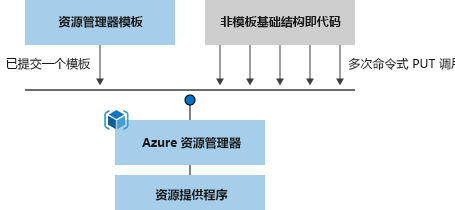
ARM 模板是 JSON 格式的声明性文件,用于定义 Azure 上资源的部署结构和配置。
- 声明式语法:描述“你要什么”,而不是“怎么做”
- 对比命令式脚本:不需手动逐步执行命令
- 资源自动部署:一次定义,多次重复部署,保持一致
📌 示例图:
🌟 使用 ARM 模板的优势
- 自动化部署
- 幂等性(Idempotent):多次部署结果一致
- 内置依赖处理机制
- 更快部署速度(并发创建资源)
- 内置模板验证机制
- 模块化设计支持(链接模板)
- 与 CI/CD 工具集成:Azure Pipelines、GitHub Actions
🧱 ARM 模板结构详解
| 元素 | 说明 |
|---|---|
$schema |
JSON 架构文件位置 |
contentVersion |
模板版本号 |
apiProfile |
API 版本集合(可选) |
parameters |
输入参数 |
variables |
模板变量 |
functions |
用户定义函数 |
resources |
要部署的实际资源(核心) |
outputs |
输出值 |
🛠️ 本地部署 ARM 模板
你可以使用 Azure CLI 或 PowerShell 部署模板。
1. 登录 Azure
az login
# 或 PowerShell
Connect-AzAccount
````

### 2. 创建资源组

```bash
az group create \
  --name myResourceGroup \
  --location "eastasia"
3. 部署模板(推荐新命令)
templateFile="azuredeploy.json"
az deployment group create \
  --name blanktemplate \
  --resource-group myResourceGroup \
  --template-file $templateFile
或 PowerShell:
$templateFile = "azuredeploy.json"
New-AzResourceGroupDeployment `
  -Name blanktemplate `
  -ResourceGroupName myResourceGroup `
  -TemplateFile $templateFile
🔁 模板嵌套与链接部署
- 使用链接模板组织复杂项目
- 主模板可调用其他模板
- 使用共享存储或 SAS 令牌管理子模板安全性
💡 示例模板:部署存储账户
{
  "$schema": "https://schema.management.azure.com/schemas/2019-04-01/deploymentTemplate.json#",
  "contentVersion": "1.0.0.1",
  "parameters": {},
  "variables": {},
  "functions": [],
  "resources": [
    {
      "type": "Microsoft.Storage/storageAccounts",
      "apiVersion": "2023-05-01",
      "name": "learntemplatestorage123",
      "location": "westus",
      "sku": {
        "name": "Standard_LRS"
      },
      "kind": "StorageV2",
      "properties": {
        "supportsHttpsTrafficOnly": true
      }
    }
  ],
  "outputs": {}
}
🧪 调试与排错技巧
| 问题 | 解决方式 |
|---|---|
| WAM 登录失败 | 使用 Update-AzConfig -EnableLoginByWam $false 禁用 |
| PowerShell 5.1 兼容性问题 | 切换到 PowerShell Core 7.x |
| 浏览器登录失败 | 使用 Connect-AzAccount -DeviceCode 登录 |
| 网络错误 | 检查代理或使用公网环境重新登录 |
📈 DevOps 集成部署
将模板集成进 CI/CD 工具,如:
- Azure Pipelines
- GitHub Actions
自动完成模板验证、部署、资源一致性追踪等。
📚 结语
通过 ARM 模板,可以实现真正的基础设施即代码(IaC)自动化体验。在 DevOps 实践、团队协作、云环境一致性构建中起到核心作用。
如有任何问题,欢迎在评论区讨论,或访问作者主页:Donald He on GitHub



本文基于 Microsoft Learn 教程整理与改写,转载请注明作者与来源。